
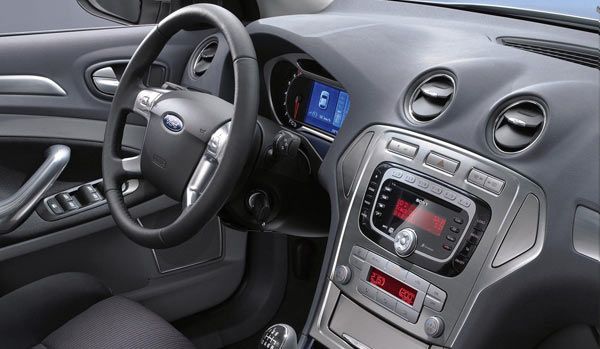
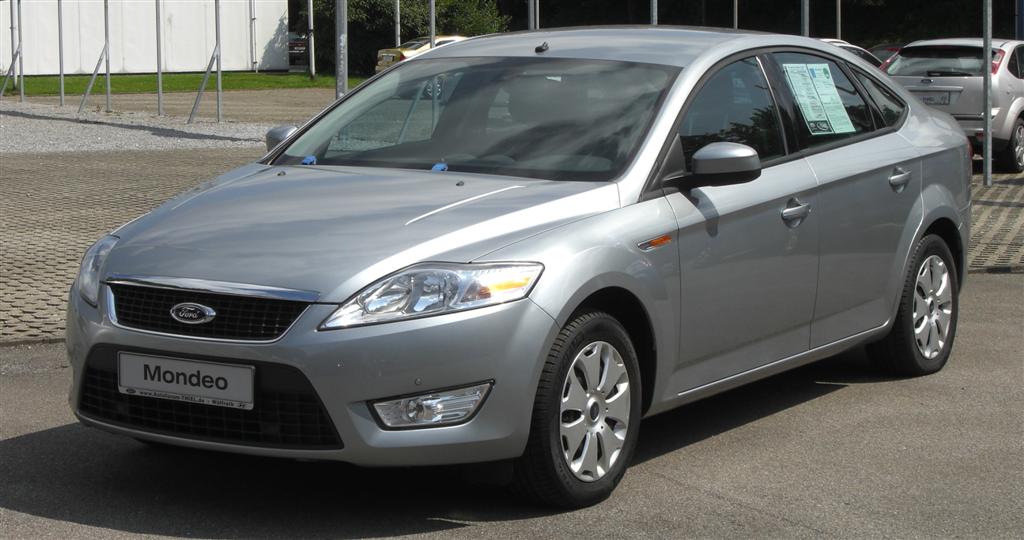
n this guide, I will explain how to remove the standard stereo from a Ford Mondeo MK4. The stereo below is the base stereo, but there are different options available (Sony and Satellite Navigation upgrades). Fitting / removal for listed stereos all have the same procedures, and all connectors across the range are exactly the same (Quadlock). This type of stereo is fitted to all Mondeo’s built from 2007 till present.
Standard Stereo & Car
Recommended Tools*
- Bojo Tools – Narrow Wedge Pry Tool (ATH-1) :: Purchase Here: (http://bojotoolseurope.net)
- Flat Head + Philips Head Screw Drivers (Halfords)
- Mini Socket Set (Halfords)
- Torx / Star Allen Keys (Halfords)
*Note above are general tools you should have when doing this type of job, but you may not need them, see tutorial for exact tools needed
Information
- The standard stereo will need a code when connecting back up
- If you are changing to a new stereo, you will require a PC2-84-4

(not required if keeping stalk controls) - If you would like to keep steering wheel controls, you will require a PC99-x50 (plus PC99 Patch Lead)
- If you are fitting a Hands Free Kit (Parrot/Motorola) you will require a SOT-092
- You will need to find an ignition
Steps
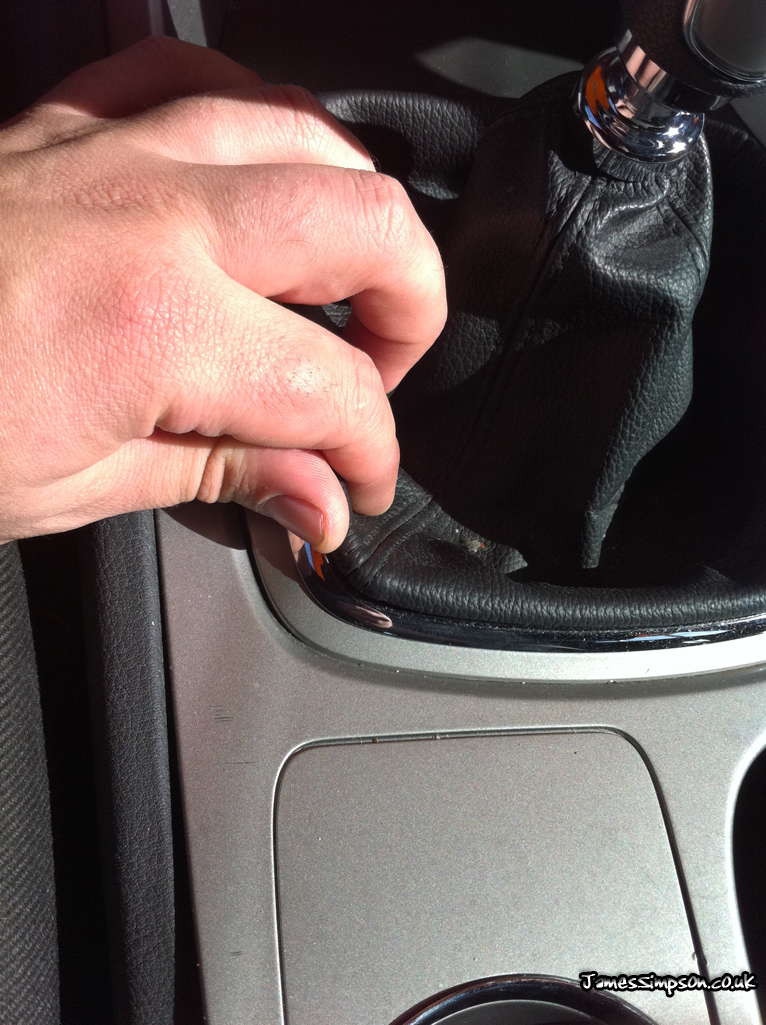 | First start by removing the geargaiter. Thiscan be done by hand by pushing the plastic holding the leathergaiter inwards and pulling upwards (pushing the clipsinward from under the silver lip in the picture)Once un-hooked, lift the geargaiter all the way up so itsout of the way for the next step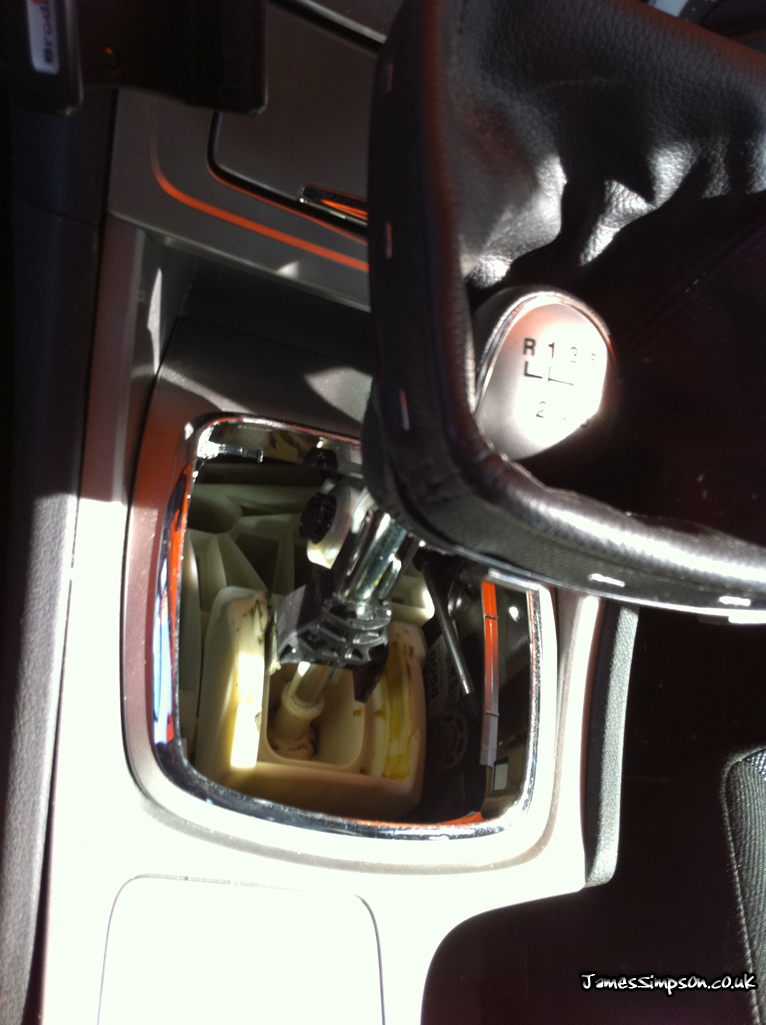 |
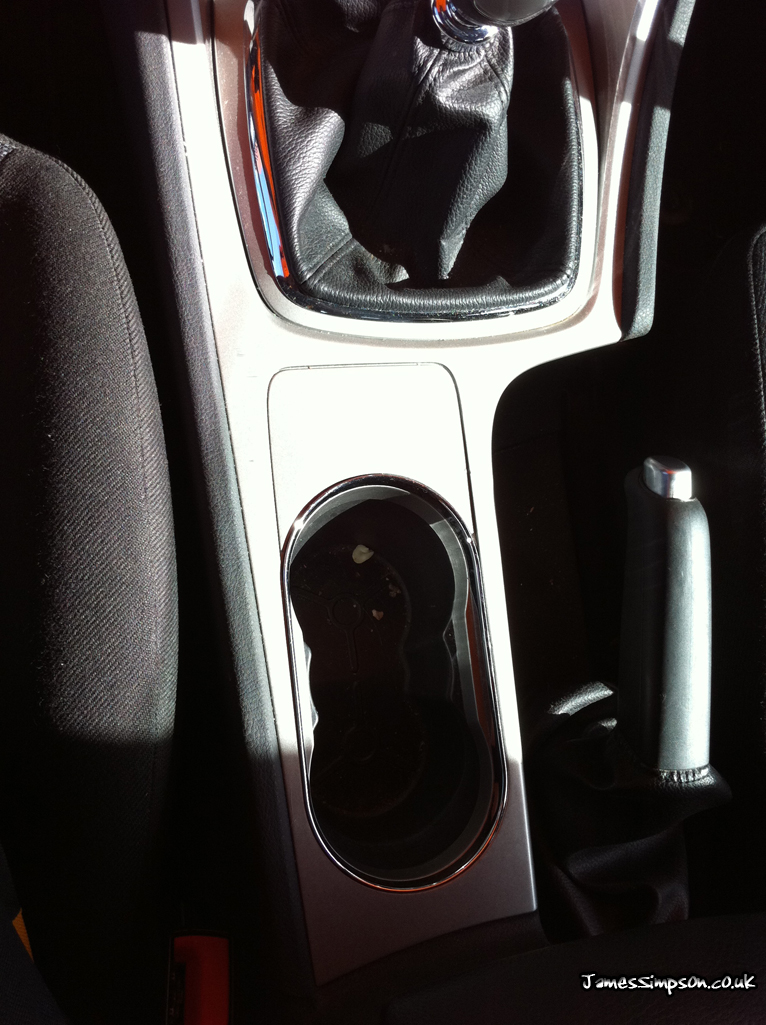 | Next we will need to pull the silver trim up towards the roof of the car (this is just held in with metal push clips)You will need your Bojo tool (or similar plastic trim removal tool). Starting to the left of the cup holder, prise the trim tool between the plastic trim and the dash panel, and push the tool towards the front of the car. Once you have it started with the tool, you’ll be able to grab it with your hands.Once you get towards the ash tray, pull the trim towards the rear of the car, to release two pop clips that are found each side of the ash tray.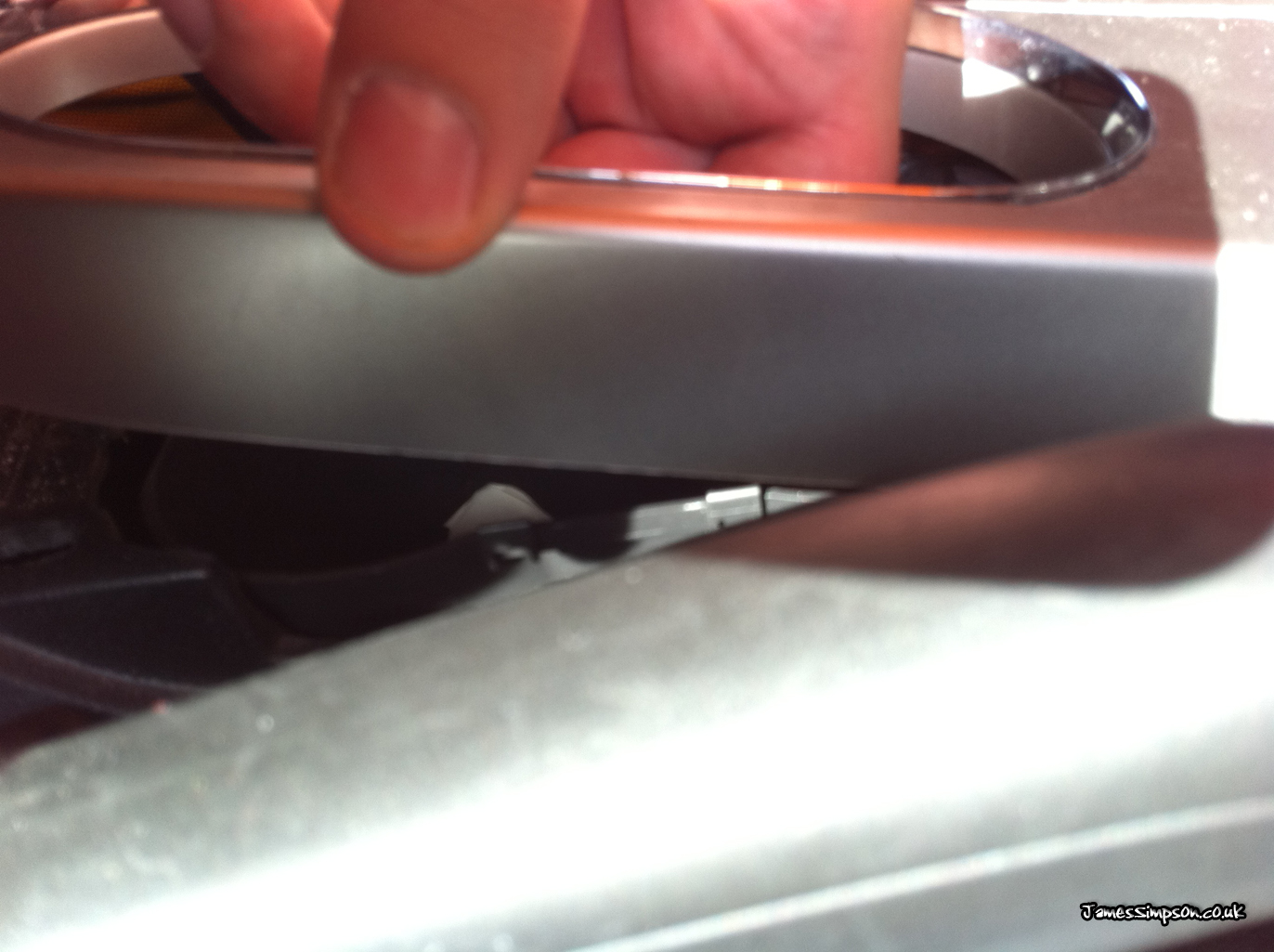 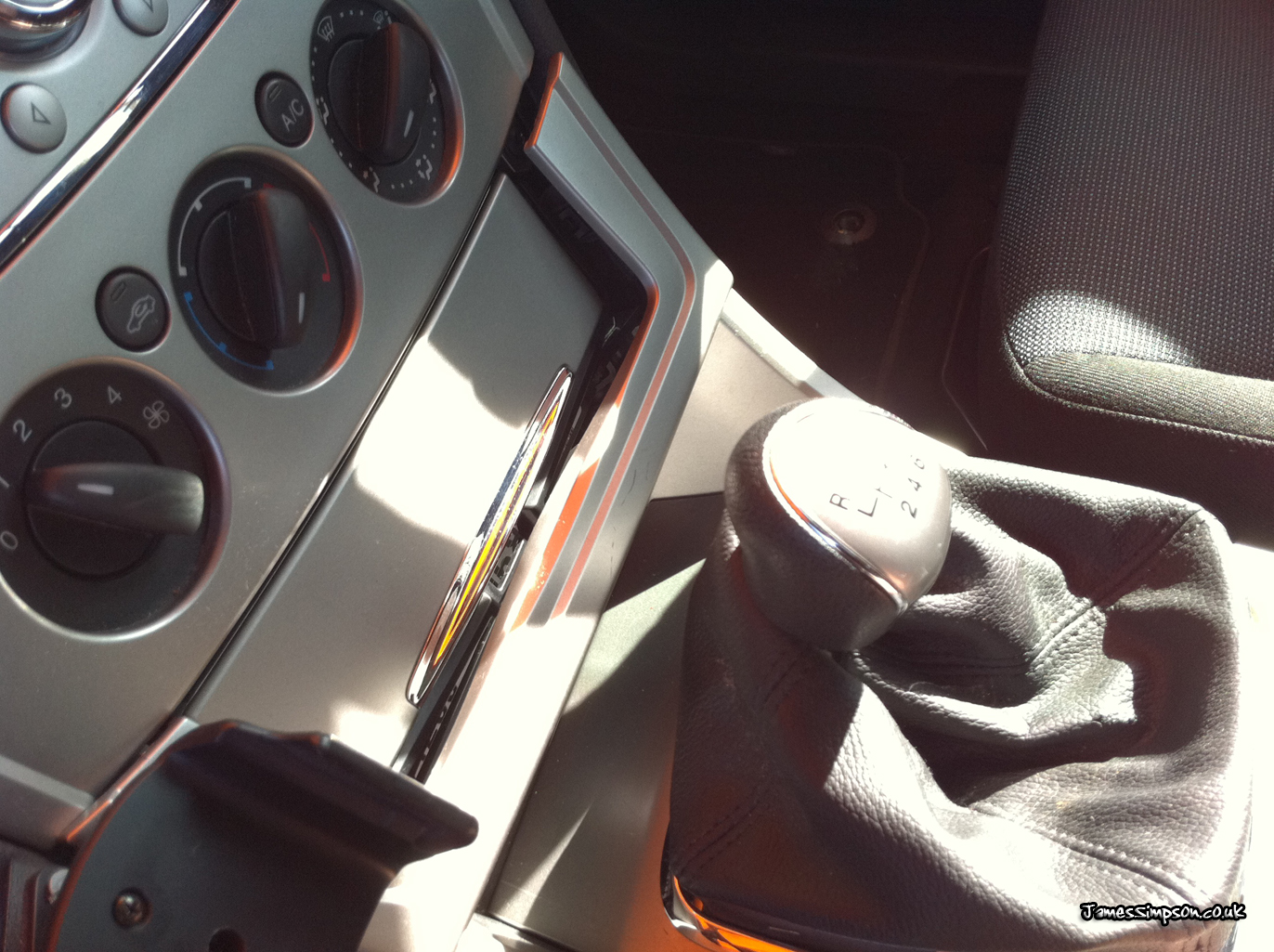 |
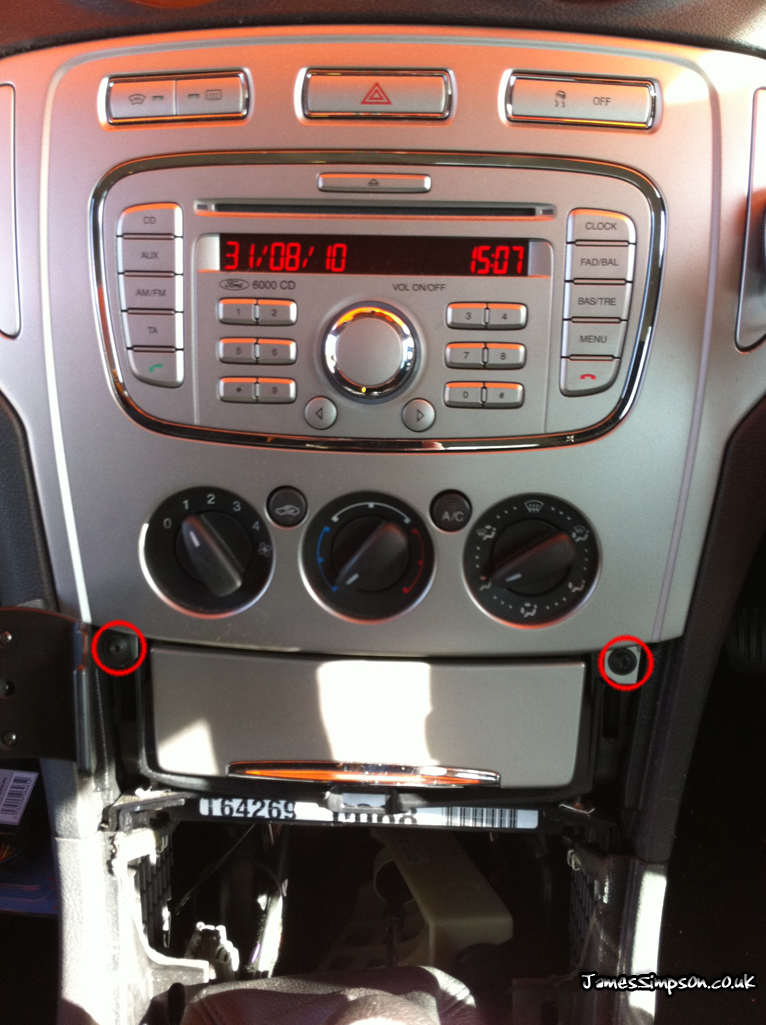 | Once you have removed the bottom plastic trim (this will now just lift out, don’t forget to feed the geargaitor through the hole), you will notice twotorx / star screws holding the bottom of the fascia in place.Remove these andproceed to the next stepDO NOT TRY TO PULL THE FASCIA OFF YET, AS THERE ARE MORE SCREWS HOLDING IT IN |
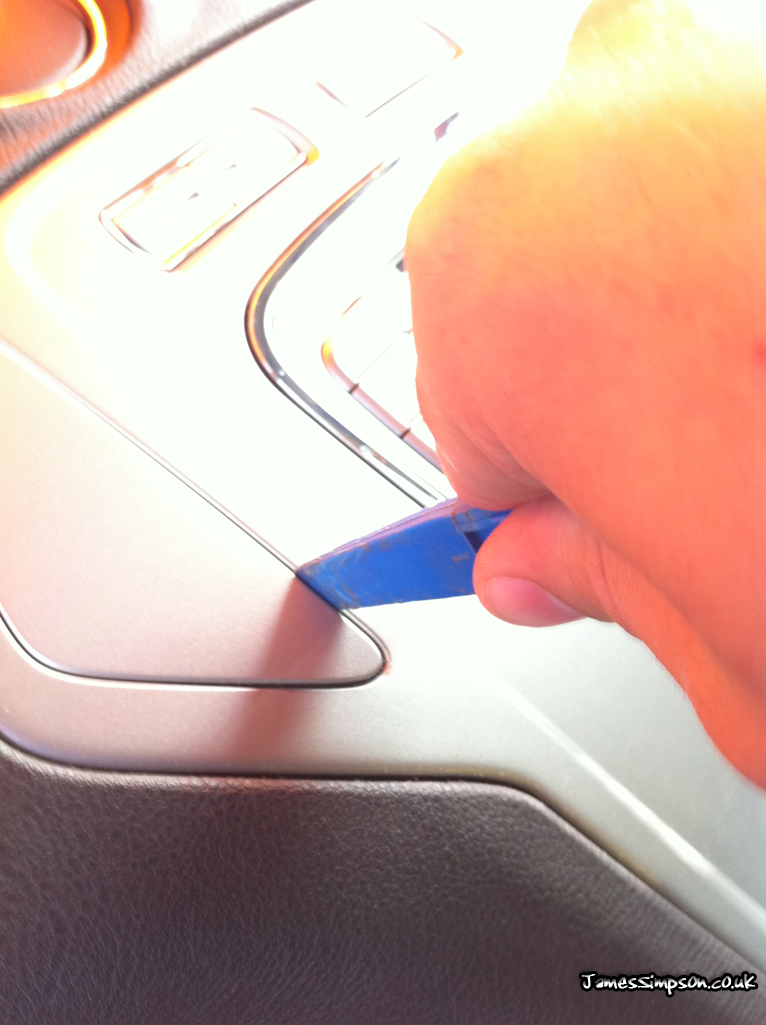 | There are now two plastic trims each side of the stereo that need removing. Using your trim tool, prise the plastic trim off (held in with plastic clips)On some models, the trim closest the steering wheelcontains a starter button. The trim is held in the same way, but be careful not to damage any of the wires that connect to the button.Once you have the trims off, you’ll see two torx / star screws under each panel, these need to be undone, then the whole trim should just pull off towards you.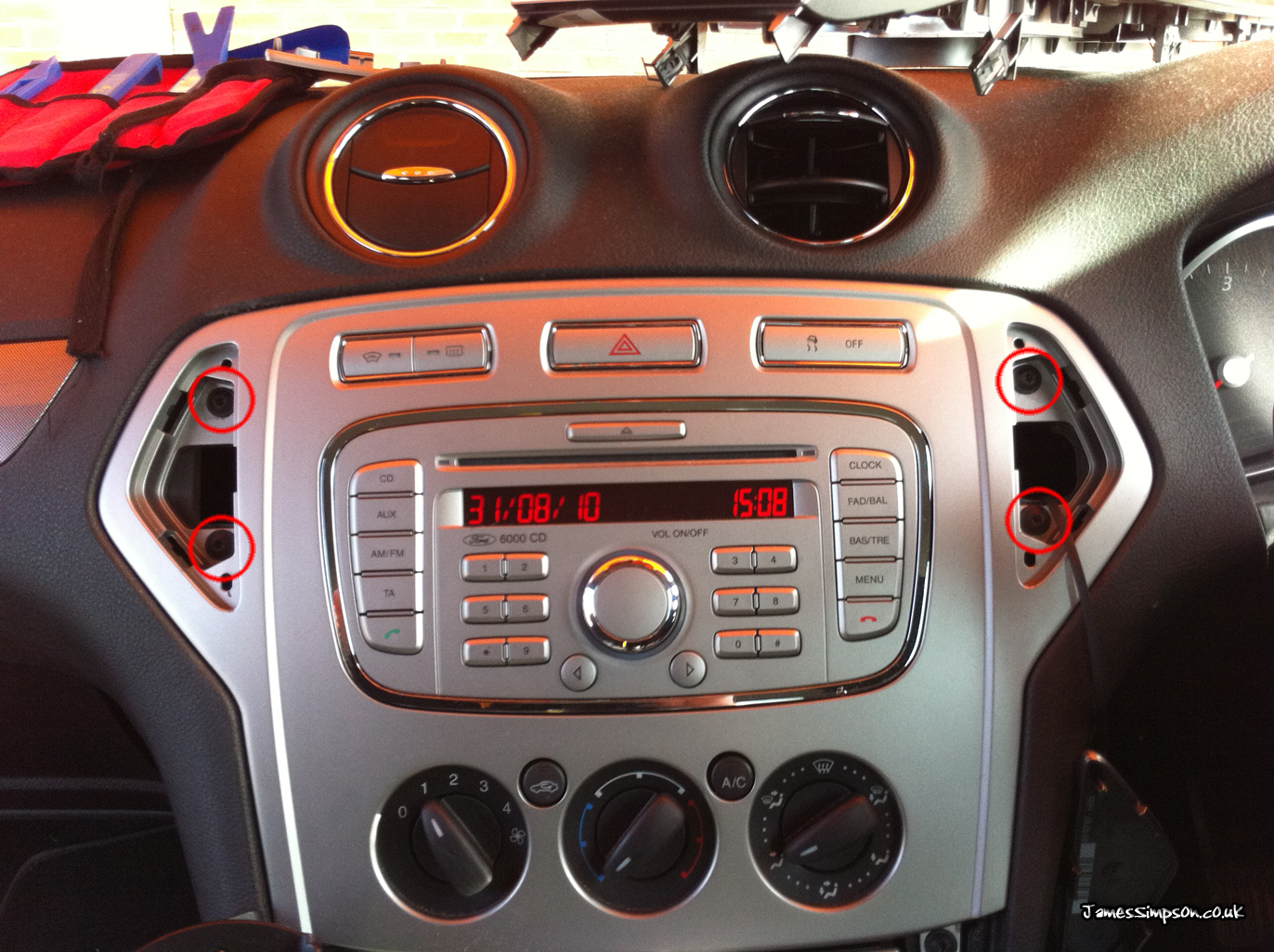 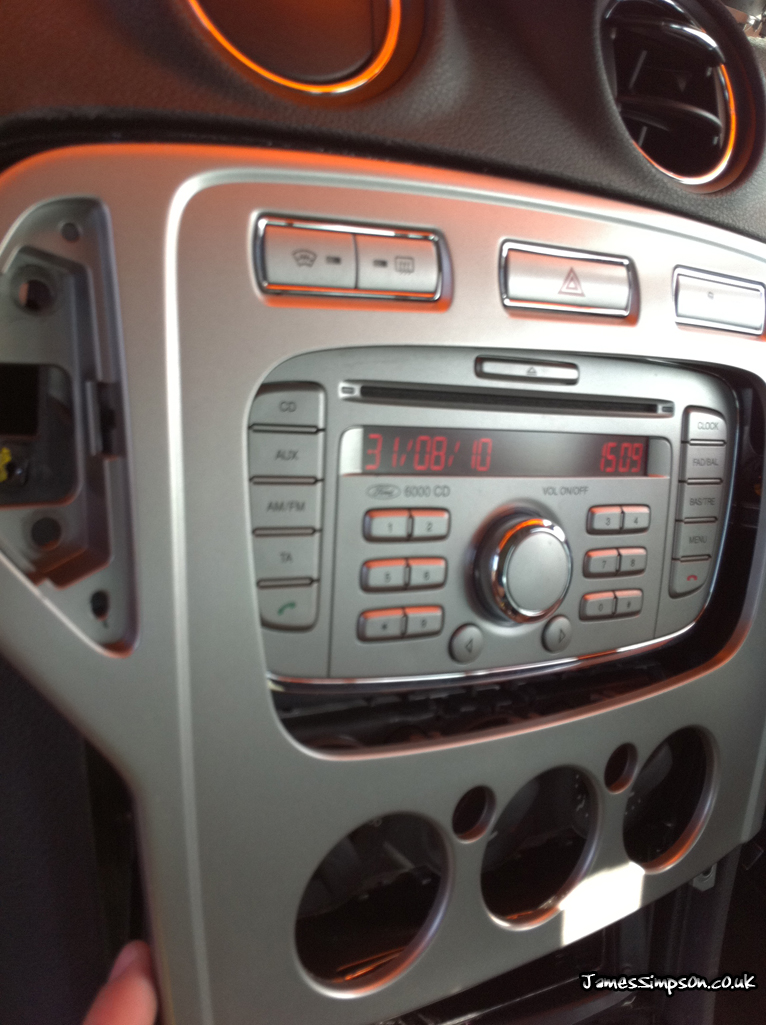 |
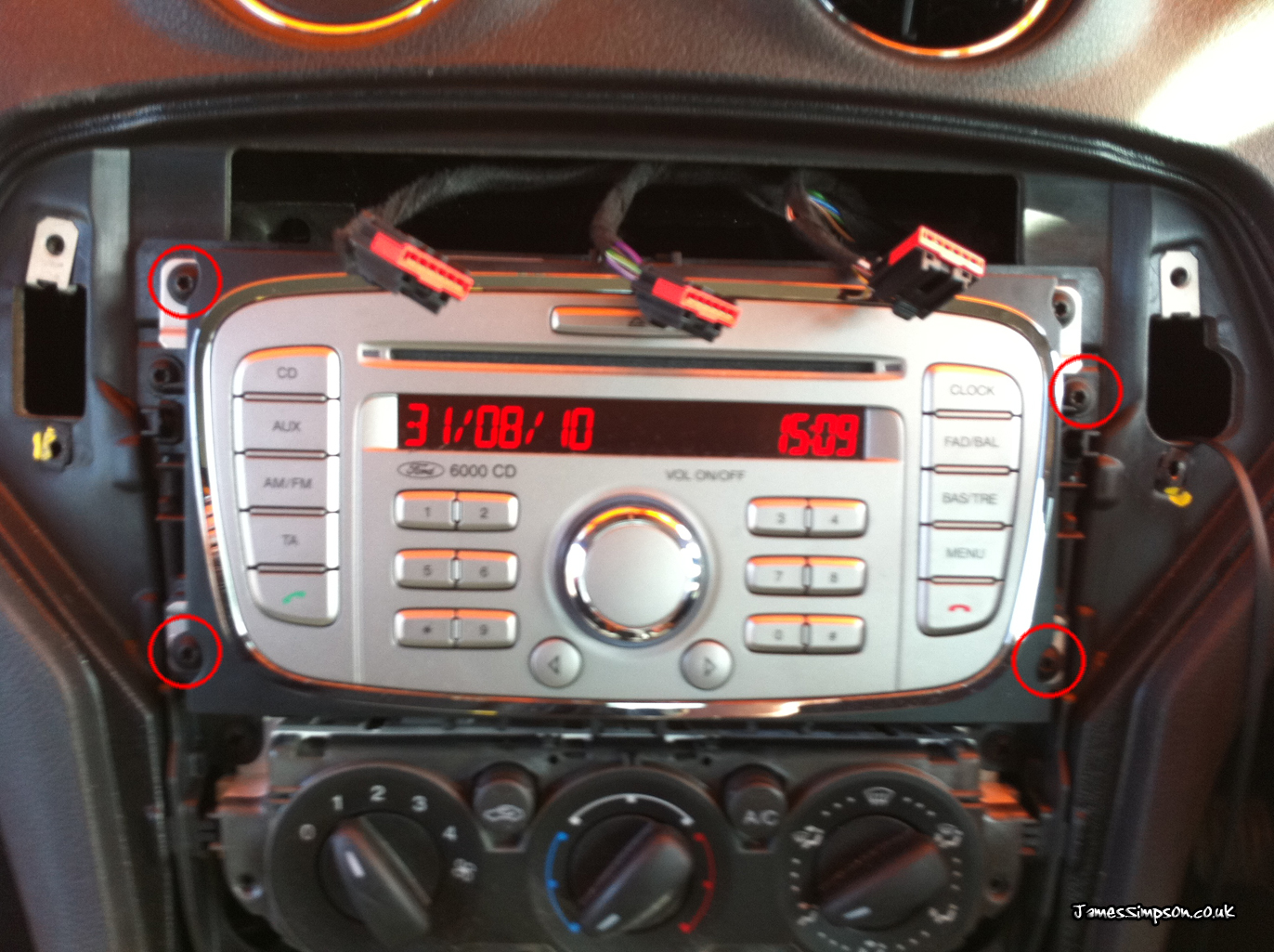 | Once you have removed the fascia (there are buttons on the top of the fascia which needto be un-plugged), you will find 4torx screws holding the stereo in place.The stereo will now simply slide out.If you are fitting a device that requires an ignition, you will need to find an ignition from the fuse box. Now there are two options for this… 1. Tap into a fuse that is on an ignition supply using a fuse spur, this option is the easiest, and all you need is a multi meter to find out if the fuse comes live with ignition. Remember to find out which leg the power actually comes from, so you can make sure to put the spur the right way round.2. Tap into a wire that has an ignition supply going through it (the second option is harder to do, and requires a bit more time) |
Hi hope you can help I’ve taken out the original stereo and put a JVC one in but the standard iso connector doesn’t have a ignition live so I’ve piggy backed one from fuse box but now the stereo only works on second position key help!!!! As soon as I turn the engine off the stereo goes off too
Hi James ,I have a 6000cd radio for mondeo 57reg ,if I am in a built up area the radio will pick channel up once I go on motorwayI lose it ,I have changed ariel and base but still same also if next to building I can manually tune in all stations ,but it will not search for channels itself any idea please did phone one auto place they said radio not worth repairing .
Can I get the serial number for a Sony second generation radio without removing the radio?
Hi Salsa,
You will need to remove the stereo to get this information.
Hi
I have a 07 mondeo zetec with a standard 6000 cd unit fitted would a dab cd 345 sony work only difference i can see is the fakra plugs at the rear i figure i can get a conversion lead for this or would it be easier to put an aftermarket one in its place like the audiovisionstar ones on ebay basically just trying to get dab in the car
regards
Nick
Hi Nick,
You can fit these fairly easily, but as you say, these have different connectors on the back. Personally if it was me, I would chop the current plug and fit the new quadlock connector onto the wires, which would then get the stereo working (a bit harder if you do not know what your doing).
The other alternative would be to buy an aftermarket stereo, and get the converter leads, in which case it would all just be plug and play.
Hi, great read
I hope you can help me, I need to replace the fascia on my mondeo (58 plate). You have the same design in the pictures you have on this page. But I can’t find them anywhere.
I was thinking of getting a carbon fiber look replacement.
Do you know where I can get one from
Hi Brian,
eBay is usually the place I look for that type of thing, or if you would like to spend that little bit extra, you could take the part to someone who does hydro dipping.
I want to replace my standard sony as it displays ‘cd drive fault’.
But unsure if I should go for eonon ,as sound quality is important.
Should I go for more respectable brand like kenwood and get a fascia kit and steering wheel adaptor.
Or does the eonon sound good? , and is it reliable ?
hi hope you can help I have a 2007 mk4 mondeo I have just fitted a eon on 5161 radio gps cd and I can’t get the stalk controls to work they are the voice control and answering phone and ending calls hope you can answer this one eon on sent me a new wiring harness and another cam us but it is still the same please help thanks brian
Hi James,
I have replaced a 6000cd for an LS RNS basically plug and play but my voice control now will not operate on the radio or CD whilst I have Bluetooth this also does not work on voice.
Any ideas?
Car has just had new bonnet cable fitted and the battery was removed. Once reconnected and the radio code inputted the stereo works fine but the cd player displays a cd drive fault. Model type Sony 6CD DAB.
Is there a simple fix or something more complicated required?
Hi James
I have a mondeo 2009 i have changed the sony 6cd DLB for a EONON it fit ok everything sort of worked apart from when i synchronized my phone with the stereo it synchronized ok but the phone will not work through the stereo and the controls on the steering wheel for the phone do not work as well
i have read the troubleshooting in the EONON mauel this says something about 2 wires on the new plug in wiring harness butt i do not understand.
Hope you can help as when i contacted EONON about a different issue they did not want to know.
Thanks
Shane
Hi James,
I have just brought a Mondeo on a 57 plate so its the new looking model and it has the 6 CD Mp3 sony head unit.
Now i know that AM signal is pointless in this car and wondered is there a DAB unit that could be added to my current headunit or would it be the case of removing it and replacing the whole thing?
regards
S
Hi Si,
There are a couple options, but the cheapest is to get a dab stereo that will replace your current stereo. Either aftermarket or standard figment.
Hi James
I have a mondeo titanium x tdci auto 58 registration with a sony 6 cd dab audio do you know if I would be able to change this for a ford sat nav unit such as a LS RNS part number 9M5T18K931DA as there are a couple of these on ebay for about £600 each and if so would my steering wheel controls , phone etc still work and would the car need to be re programmed by ford to make it work . Any advice would be much appreciated .
Hi Richard,
This will fit no bother, and yes the steering wheel controls will also work. One question though, are these units complete (i.e. they come with the GPS antenna too?)
Thanks
James
Hi James
Thanks very much for your reply the advertiser states that it comes with ( security code, GPS aerial, navigation SD card, and instruction manual. He also says that it is Bluetooth ready ( with the appropriate module) would I already have this as my existing unit works with my phone or is it built in to the unit, do you think I will need any other wiring plugs etc,and would the car need to be reprogrammed by ford for the new unit to work with steering wheel controls ,and convers + screen
Your help is very much appreciated many thanks
Richard
Hi Richard,
It sounds as if everything should be plug and play for you, as you have all the required parts for it all to function properly.
Thanks
James
Hi James
Thanks for such a quick reply I think I will go ahead and buy one
And see how it goes .I will keep you informed of my progress but don’t think I will have time to fit it until after Christmas .
Thanks very much for your help and have a great Xmas and new year. Richard
Hi James
I have an 08 Mondeo estate with the 6000cd unit. In the last few days it has taken to displaying “phone” (I have no bluetooth loom or phone connected) – and of course, no radio stations! no cd! and no aux in for my mp3 player! But then it’s fine again…..then it’s not, then…..you get the picture, it’s driving me mad!
Loose wire? can I ascertain what the problem is from behind the unit? do I need to go through this removal process which you have so clearly laid out for our collective benefit?
Help!
Bob
Hi Bob,
In no doubt there is a loose cable somewhere – it could even be a previous owner had a hands free kit fitted, and the cables were just left in place.
If you go through the removal process, you should be able to see if there are lose cables behind there touching metal.
Thanks
James
Hi James,
I am in the process of fitting an Eonon D5161 to my Mk 4 Mondeo, it seems that the Eonon unit has so many wires out the back that it won’t slot in all the way. Do I have to cut the plastic bracket at the back?
Cheers
Jim
Hi Jim,
Yes it can be easier if you trim a bit of the plastic from the back to feed the wires through.
Thanks
James
Thanks James.
Great site, keep up the good work.
No problem Jim – and thanks for the donation.
Hi
How is your installation progress going. Have same unit to put in. Any problems?
Thx
That was excellent. Just what I needed to get my radio working after driving over speed humps stopped it working. Very clear.
Discovered your article on removing Mondeo radios. I needed to get the reset code which was writen on the side of the unit. Your instructions were spot on and simple to follow. It took me 20 mins to get out, put back in and reset, fantastic. Saved me £50 labour costs.
Tools used. Star shaped screwdriver bit. Thin flat blade to help ease out the triangle shaped covers. And a little bit of brut force.
I have a new keyless fob for my 2008 keyless start Mondeo which needs to be tuned in. Have you got a way of doing this with out having to go to Fords?
Many Thanks
I hope you can help me. I have a iPhone 5 and that does not work with this radio anymore. I have to update it to the latest software version along the USB port of the radio. Good you tell me maybe how and where can I find the USB port?
Hi Menno,
By the sounds of it, if you haven’t found the USB port in your car, you wont have one installed…. However, you can use a laptop with a bluetooth connection to update your device, by simply connecting to your device via bluetooth and use the software you would have placed on the USB stick and drag and drop the file into the bluetooth unit.
Thanks
James
Can i clean lens on a Sony 6cd auto changer in a MONDEO 57 titanium x with a cd lens cleaner, thanks
Hi Imran,
You can try yes, but I’ve not had any luck with CD cleaners in the past.
Thanks
James
Thanks for the reply but the disc cleaner just ejects itself out so will have to buy another system off eBay ?
Hi James
Many thanks for the information ,is it the same for a automatic gear lever??
Hi James
I have a automatic mondeo is it just the same as a manual , do you take the sane facias off around the gear lever ? many thank for imformation
Hi there,
Yes there is no difference between the auto and manual. The process is the same.
Hi there.
There may be a couple of little differences when removing the trim around the auto gear shifter but apart from that everything will be exactly the same.
can you tell me i have a 08 mondeo with a blaupunk touch screen sat nav does the four ford keys allow the unit to come out so as to conect a fakra mouse aerial thanks any imfo much appreciated
arriva cheshire
Hi Arriva.
If you have a 08 Mondeo then there are no keys to remove the stereo, you will have to follow the guide and remove all the relevant trim panels.
Thanks very much – I havent worked on a car for over 20 years and it was all alien to me after such a long break – however your guide helped my get my radio out and re-coded.
Just a point though – if you lose your Radio KeyCode number on the Mk4 Mondeo CD6000 unit you can get the Radio Serial No by pressing buttons 1 & 6 together and the radio will scroll through a whole range of numbers – when it gets to a number starting with L or M or V make a note of the number.
If it is prefixed with L or M you can just get hold of your Ford dealer and they can retrieve the KeyCode number from that Serial No alone.
However if theserial number is prefixed with a V it all gets more complicated. Then you do have to remove the radio using your process, then on the left side of the radio you will find both the Serial No and also the Radio Part No. With both of these numbers your Ford Dealer can retrieve the Radio KeyCode for you
Hi James,
My Sony 6000 cd6 ( 2008 Mondeo mk4 2nd gen Sony with Bluetooth ) is giving a “drive fault” error when I try to load a disc or sometimes wont accept a disc at all. Any idea how to fix this?
Cheers
Jim
Hi Jim,
There is defiantly a mechanical fault with the stereo if it is showing this error. There could be a number of reasons for this, the common one I have seen was a penny or some other object pushed into the CD tray (kids?) stopping the mechanics working correctly. It could even be a bent connector or a dodgy motor.
It may be worth taking the stereo out and giving it a shake to see if you can hear any lose parts inside… other then this, it could be expensive for someone else to repair, or even tricky for yourself to repair.
Thanks
James
Ok, I’ll have a go at getting it out, Thanks for your help James.
Great guide if you have a parrot is there much to connect? Is it easy to figure out. Top guide excellent work!
Nope there isnt much to connect in terms of installing a parrot. With these guides, everything is plug and play.
Thank you very much for such a great guide. i was able to get my head unit out with no damage. I didn’t have a bojo tool just a filler knife with plenty of electrical tape wrapped around to minimise any damage.
Any ideas why the head unit won’t accept cds when loading?
Great guide, James! Better than the advice from my dealer: “gently pull out the fascia, and hope that nothing breaks off ” , can you beleave it?
Now what I would like to ask you, so I don’t go taking the lot apart for nothing: I have the standard Sony unit with built-in cd player. I also have a Sony 6 cd-changer and would like to connect it to the unit in the car. It has red and white tulip plug for right and left channel, and a black plug with what looks like 3 contacts within a circular ground contact. Does the unit in the car have connection available for this?
Hope you can help.
Mario
Hi Mario,
I take it the cd changer you have is a aftermarket unit? If so, it will not be a plug and play operation into the back of the stereo. The ford’s use a standardised quad lock connector in which everything plugs into. Now I’m not saying it isn’t possible to connect this CD changer, there are converters around which allow you to do so. Have a search for Connects2 they make connectors to connect aftermarket CD changers to standard stereos.
Hi James,
Sorry for digging this up but have a question!
I am possibly changing my non-touchscreen sat nav to the touchscreen version, the new satnav obviously includes the new fascia plate!
However the new fascia plate comes with different buttons on the top of the plate, in such the new one only has the park sensor, hazard lights and front and rear heated screen buttons, whereas mine has all the above plus a traction control switch, which is halved with the park sensor bank. Can you pop out these switch clusters and just change them into the new one or not?
Rob
Brilliant guide, thanks. One question if you don’t mind, in the list of parts required you list the PC99-x50 to retain steering wheel controls. Other sites selling this adapter specify it for mondeo Mk3 up to Feb 2007. Can you confirm if this adapter fits the 2008 Mk4? A fitting kit listed on another site lists a CTSFO003 as part of a fitting kit for 2007->, it’s quite a bit more expensive than the PC99-x50. I have an Alpine CDE-103BT and would like to retain the steering wheel controls if possible. Any help would be appreciated.
Hi Great Guide ! Now could you tell me if you know how to release and fit a new gear knob on my Mondeo Mk4 Tdci 2.0 ? Thanks !!
Hi Rob,
The gear knob should just unscrew
Thanks
James
Hi James,
Very informative guide, would i be able to swap my Ford 6000CD unit in my MK4 09 Mondeo for the Sony 6000CDC?
Also is there any connections mod req’d
Thanks.
Hi James thanks for the information on the MK4 radio removal.Please I would like to ask you further question:
My version is of Ford galaxy 2007/08 model with sat nav dvd, which seem to have both the sat nav radio, and the A/C attached or inseperatable . Can I remove the sat nav radio without affecting the A/C ,’cos I would love to replace the entire sat nav radio system?.Please do shed more light on this.
Brilliant instructions many thanks it made my life a lot easier. I do have a question you may be able to help with though. After changing my head unit the problem turned out to be a blown rear speaker! I have been offered 2 x front speakers from a MK4 Mondeo are they the same size etc as the rear?
Can this guide be used for the MK4.5? (mondeo from 2011). There is no trim around the ash tray and the two plastic trims on each side of the stereo are not just small trims but goes all the way down.
But maybe the clips are located the same places as in the 2007-model?
Hi Hvalen, yes the guide can still be used, as the removal process is very similar
Thanks for this guide. My wife went over a pothole and managed to kill the GPS (kept reading no satellites). I bought radio removal keys to get the touchscreen nav unit out and check the connections, then realised with the 4 keys stuck in the radio that it wouldn’t come out as easily as that.
This guide completely saved my bacon and made sure I yanked and prodded at the right things to get the radio out. Plus, it turns out the wire just needed disconnected and reconnected – so everything is back to normal. Absolutely could not have done it without this – so cheers for taking the time to put this up.
Excellent guide, it helped massively! Thank you very much!
Many thanks. It only took me an hour to do what I needed to do however, without your help I think I might never of achieved it. Cheers.
No problem, what I put these guides up here for :)
Hello, there just a quick question, how to replace rear door speakers??many thanks
To replace the rear door speaker, you must remove the rear door card, this is held in by a few bolts/screws, the rest is held on with “pop clips”.
The bolts are under the plastic trim behind the grab handle, and another screw behind the plastic trim of the door handle.
Once you have removed these, the rest of the door card is held on with pop clips that just come off when you pull them.
Helped me out loads a bjg thanks
Perfect, Thank You
Very clear instructions – thank you !